Content calendar
Edit your posts
Change hooks, captions, hashtags and notes, and keep track of each day's status.
Click any day in a calendar to open its editor. Change anything, then click Save.
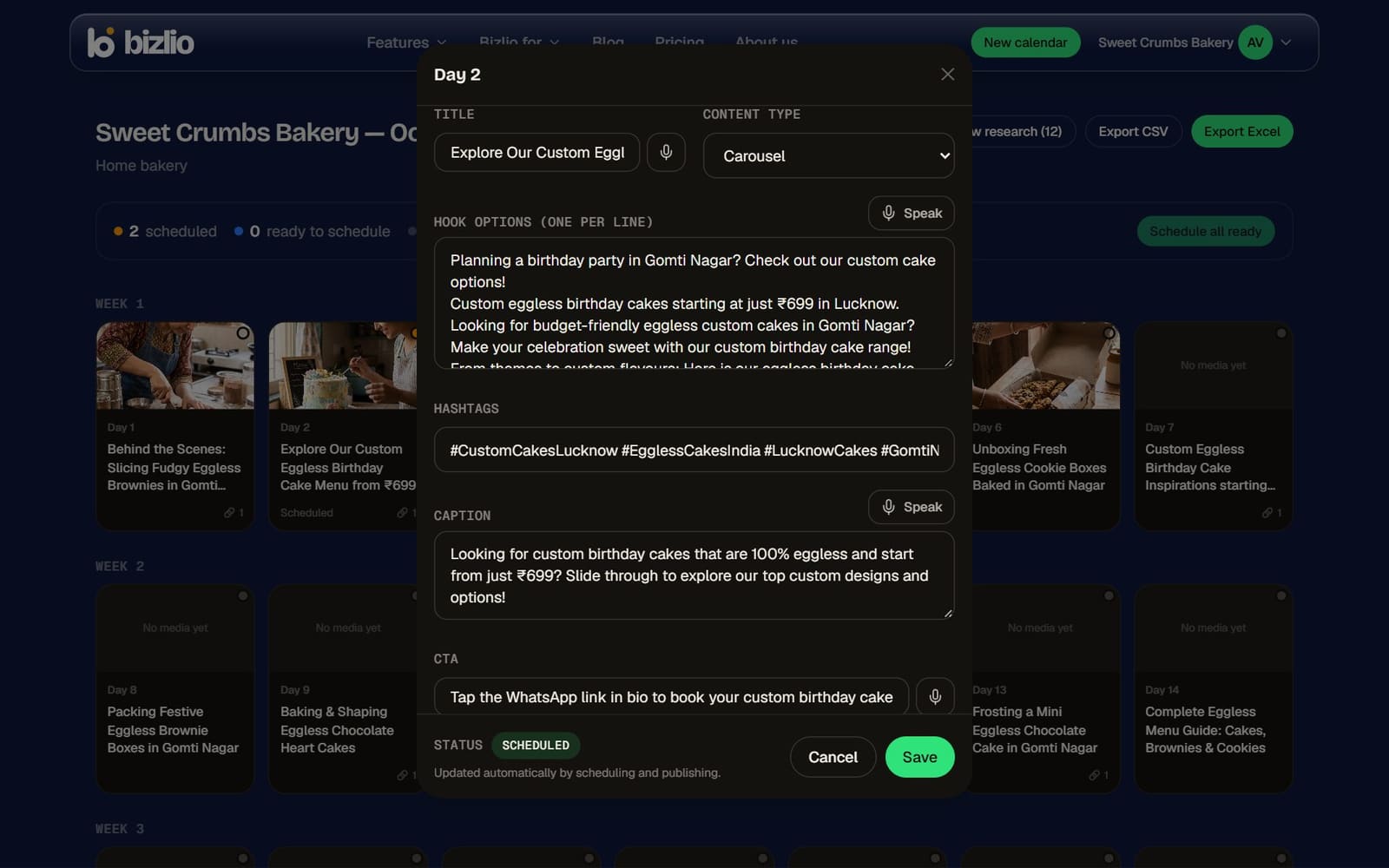
The parts of a post
| Field | What it's for |
|---|---|
| Title | What the post is about, for you. Not posted. |
| Content type | The kind of post, like "Behind the scenes" or "Tutorial". |
| Hook options | Opening lines that stop the scroll, one per line. Use your favourite as the first line of the caption or the text on a Reel. |
| Caption | What's posted under your image or Reel. |
| CTA | The call to action, like "Order on WhatsApp". |
| Hashtags | Added at the end of the caption when it's published. |
| Production notes | A shot list for a Reel, or the text for each carousel slide. |
Tap the microphone next to a field to speak instead of typing, in Hindi, English or Hinglish.
Day status
- Draft: still working on it.
- Approved: content checked and final.
- Posted: you posted it yourself, outside Bizlio.
Once you schedule or publish a day from Bizlio, its status updates by itself: Scheduled, Publishing, Posted or Failed.
Link a post to a product
If you have a website, pick the product a post shows under Product in this post. Your website's Instagram-style grid then opens that product when someone taps the post. You can also add "Price & order: link in bio" to the caption with one click.